Nutrisense
Bridging the Gap Between Blood Sugar Tracking and Real-Time Coaching
.png)
My role
-
UX designer
-
UX researcher
Tools
-
Figjam
-
Figma
-
Miro
-
Replit
-
Whimsical
-
Proto.io
-
UX pilot
Timeline
-
1 month
Deliverables
-
Journey Map
-
User persona
-
Competitive Analysis
-
Insights Report
-
AI Use Case Mapping
-
Feature Specification Document
-
Low-Fidelity Interactive Prototype (Proto.io)
-
Integration Flow Blueprint
GOAL
The goal of this project was to design and prototype an AI-powered sidekick that supports people with diabetes in making real-time, personalized food and lifestyle decisions.
It aimed to bridge the gap between glucose tracking and actionable guidance by delivering timely, context-aware suggestions without overwhelming users.
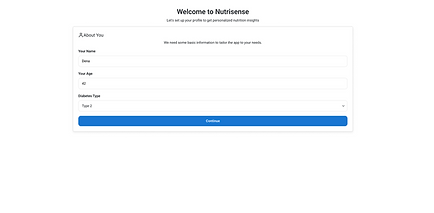
The solution focused on creating a lightweight, trustworthy, and empathetic experience that empowers users to manage their health with confidence.about you.
CLIENT
Client
Human Centered AI community.
The Human-Centered AI (HCAI) community comprises individuals and organizations dedicated to developing artificial intelligence that prioritizes human needs, values, and well-being. The core philosophy is that AI should augment and empower human abilities rather than replace them. This includes a commitment to creating transparent, fair, and accountable AI systems
THE PROBLEM
Diabetes patients using CGM monitors and other tracking tools often receive data without clear guidance on managing their blood sugar.
Most apps provide glucose trends and meal tracking but fail to offer the personalized recommendations crucial for effective diabetes management, leaving users to interpret complex health information independently.
Challenges
Provide a general description of the items below and introduce the services you offer. Click on the text box to edit the content.

BALANCING SIMPLICITY WITH PERSONALIZATION
Users needed quick, clear suggestions without dealing with overwhelming data.
The challenge was designing an interface that felt personalized and intelligent

DELIVERING ACTIONABLE GUIDANCE
Users expected advice that felt personalized and credible.
The challenge was to translate evidence-based insights from research into simple, actionable design features using no-code tools.

PRIORITIZING USER TRUST
Users were cautious about relying on AI for health-related decisions.
The challenge was creating clear, empathetic recommendations that built trust without overstepping.
Discovery
Secondary Research
I set out to understand:
"What are the real day-to-day struggles of people managing Type 2 diabetes using digital tools?"
Through secondary research of reading articles and publications related to people who live with Type 2 diabetes.
This framed my research efforts around behavioral patterns, unmet needs, emotional pain points, and gaps in existing solutions.
Data overload
1.Users Are Overwhelmed by Data Without Actionable Feedback
"Diabetes apps often provide data without offering meaningful guidance, leaving users unsure of how to act on trends."
Feature overload
2. Too Many Features Reduce Engagement
"People with diabetes prefer apps that are easy to use and not cluttered with complex features."
Trust And Clarity
3. Trust and Clarity Are Critical in Health-Related Interfaces
"Users often abandon diabetes apps when information is vague or advice feels generic."
Personalization
4. Users Want Personalization Based on Their Own Data
“Patients showed strong preference for apps that adapt to their patterns over time rather than using one-size-fits-all recommendations.”
Real-Time Value
5. Real-Time, In-the-Moment Guidance Is Highly Valued
“People with diabetes are more likely to change behavior when nudges are delivered at the right time, such as after a meal or a glucose spike.”
Accessibility
6. Accessibility and Simplicity Improve Adherence
"Older adults or those new to tech found app interfaces difficult to navigate, leading to drop-off."
Competitive Analysis
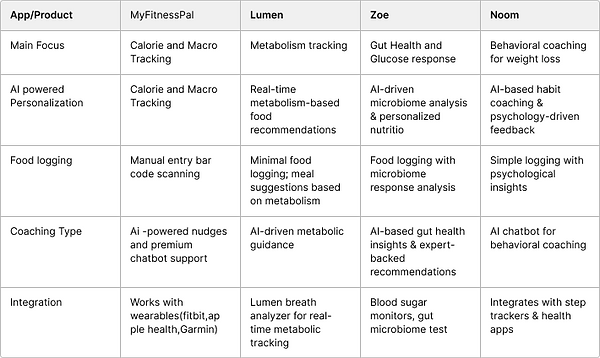
Analyzed strengths and gaps in 5 similar apps Evaluated apps
MyFitnessPal
Levels,
Zoe
MySugr
Noom
AI is underutilized for contextual coaching
Users are burdened with tracking but unsupported in decision-making
Identified gaps that are there in the apps today, and the areas where users need guidance in a personalized way. Highlighted opportunity to bridge the gap between tracking and coaching through AI.
.png)
Define
User Needs
Problem Statement clearly articulated the core problem, which helped in mapping specific user needs like blood sugar-stabilizing meal suggestions, timing guidance, and supportive feedback — all in real time
Problem Statement
How might we provide simple, personalized guidance—like smart swaps and timely nudges—right when they need it?
Design Success
and Criteria
Design Principles & Success Criteria was created such as how AI can assist as a personal coach in giving suggestions at the right moment and time to define success as increased engagement, glucose control, and user confidence in food decisions.
Prioritization Matrix
Created feature priritization matriz to map out the impact feasibility and user value to prioritize core features like smart food swaps,timely nudges,meal timing and recommendations.
Developed a feature prioritization matrix to strategically map impact, feasibility, and user value, leading to the prioritization of core features such as smart food swaps, timely nudges, meal timing, and personalized recommendations.

Persona
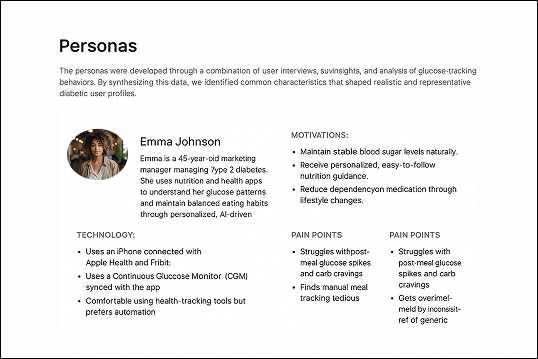
I chose Emma because she represents a proactive, health-conscious individual managing Type 2 diabetes while balancing family and work. Her need for simple, personalized AI insights makes her an ideal user for a smart glucose monitoring app.
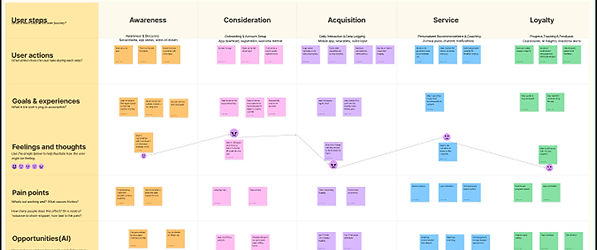
To map the pain points across the diabetic management journey
Identified real frustrations through user behavior patterns:
"I can track my blood sugar... but I don't know what to do about it."
"I get spikes and drops but don’t get help in the moment.”
Highlighted emotional pain points such as decision fatigue, data overload, and lack of real-time support
User Journey
Identified key AI intervention moments like meal decisions, post-glucose spikes, and behavioral nudges.
Post-meal spikes
Struggles with food choices
Missed meal timing
Highlighted opportunities for AI-powered sidekick interventions.
Design
To crystallize user needs, align the team on priorities, and translate research into a clear product direction for an AI-powered diabetes coach.
Experienced Flow sketching
Mapped out how users would encounter AI suggestions in their daily journey using user flows in Notion
To focus on 4 entry points for the AI sidekick, such as:
After a high glucose reading
During food logging
Before meal planning
When detecting a missed me

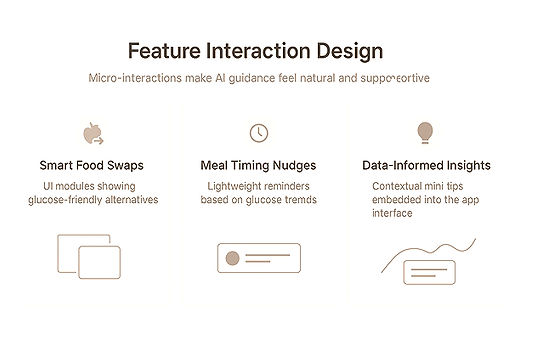
Featured Interaction Design
The AI-powered micro-interactions in NutriSense were designed to make complex data feel simple, supportive, and human. Each feature uses small, purposeful animations and feedback loops to reinforce user confidence and encourage healthier habits.
Smart Food Swaps – Subtle card transitions visually replace high-glycemic foods with healthier alternatives. This motion provides instant understanding without interrupting the user’s flow.
Meal Timing Nudges – Gentle time-based reminders appear with smooth fades or icon pulses, signaling optimal eating windows based on glucose patterns. The tone stays helpful rather than prescriptive.
Data-Informed Insights – Contextual tips slide in beneath glucose graphs, offering quick, actionable guidance like “Add fiber to your next meal.” These micro-moments connect AI feedback with daily behavior.
Low Fidelity Exploration
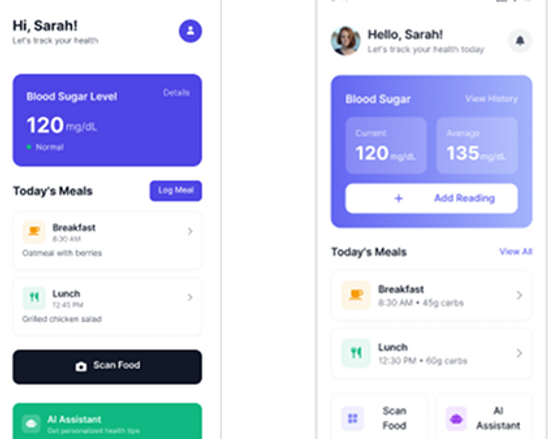
Wireframes of the four key features helped us turn research insights into tangible design solutions by mapping out the structure and flow
They helped visualize the layout and structure of key features, such as the dashboard, task management, and matching flows, ensuring the information was straightforward and easy to follow for neurodivergent users.
Through early testing, the wireframes allowed the team to identify usability issues before investing in high-fidelity design, reducing rework and aligning stakeholders on the user

Mid Fidelity Exploration
Used the low-fi wireframe and added more features like Ui elements,icons and interactions to create mid-fi wireframes
They helped visualize the layout and structure of key features, such as the dashboard, task management, and matching flows, ensuring the information was straightforward and easy to follow for neurodivergent users.
Through early testing, the wireframes allowed the team to identify usability issues before investing in high-fidelity design, reducing rework and aligning stakeholders on the user
Interactive prototype
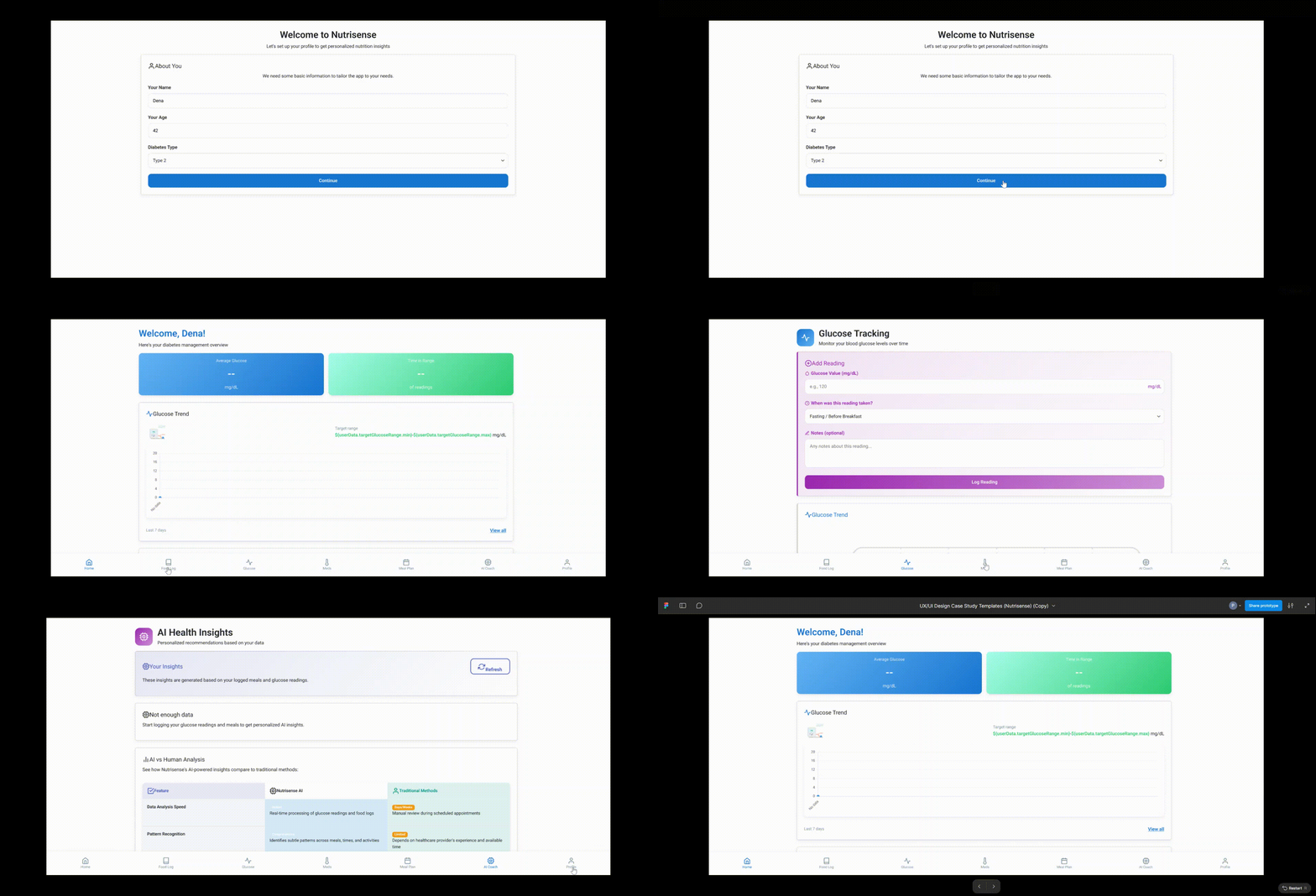
Built a fully interactive prototype using Replit, simulating AI sidekick behavior for diabetic meal guidance
No-code logic engine that handled real-time food suggestions based on user input
Results
To crystallize user needs, align the team on priorities, and translate research into a clear product direction for an AI-powered diabetes coach.
Outcome
The project successfully demonstrated that an AI-powered diabetes sidekick could meaningfully support users in making better food choices, managing glucose levels, and reducing decision fatigue — without overwhelming them with data or conversation.
Key Outcomes:
Created a low-code prototype using Replit and Figma to simulate AI-based food swaps, nudges, and timing suggestions.
Validated the AI sidekick model (vs. complete chatbot) as a more effective, lightweight coaching method for diabetic users.
Designed a realistic integration strategy for CGM and nutrition data APIs (e.g., Dexcom, Nutritionix).
Produced a complete case study and feature specification, setting the stage for future development or pitching.
Success was measured using early user testing, prototype engagement, and validation of feature concepts. Metrics were qualitative and task-based.
Next Steps
Next, this project could move into a functional prototype phase with real-time data integrations (e.g., CGM APIs like Dexcom or Libre).
A developer or health tech product team could pick up where I left off to scale the AI logic, refine the UX, and prepare for clinical or beta testing.
With the foundations laid, the next team can focus on data validation, accessibility, and secure user onboarding to bring the solution closer to real-world use
Future Steps
Real-Time Continuous Glucose Monitoring
Provide immediate, dynamic coaching through live glucose data, which offers accurate and timely support during high or low glucose events.
Adaptive Personalization
Make AI smarter with every user interaction by building trust and fostering long-term engagement, which tailors advice to each user's unique patterns.
Data Privacy & Ethical AI
Implement encryption and anonymization of data to build user trust through transparency and secure data practices.
Lessons Learned
The existing onboarding process for the FitLife app was confusing and cumbersome, leading to high drop-off rates and user frustration. New users struggled to navigate the app, understand its features, and set up their profiles, which negatively impacted user retention and overall satisfaction.