PLAYGUARD
Empowering Parents in a Digital World”
Designing trust, control, and clarity for modern families.
_edited.png)
My role
UX designer
UX researcher
Tools
Figma
Figjam
Miro
Whimsical
UX pilot
V0 vibe coding
Timeline
2 months
Deliverables
Landing pages
User journey Maps
Sketches
Wireframes
Mockups
Prototypes
Design system
Goal
The goal of PlayGuard was to design a calm, trustworthy UX that reduces cognitive load for parents while helping them confidently choose safe digital experiences for their children.
Problem
In a world where children are growing up surrounded by digital content, parents are under constant pressure to make smart, safe app choices—but most tools aren’t built with their needs in mind.
PlayGuard is a family-first app discovery platform that helps parents like Sarah confidently manage their children’s digital lives. By combining trusted reviews, adaptive filters, and real-time support, PlayGuard replaces guesswork with guidance—turning digital anxiety into empowered parenting.
This case study explores how we identified core user pain points, designed intuitive solutions, and built an experience that supports both parents and kids in navigating today’s app ecosystem.
Discovery
Steps taken for User Research
Surveys
Worked with business Analysts to gather results of surveys and ideate on the challenges of the current problem.The key pain points identified were a lack of trust in app ratings and difficulty in finding age-appropriate content.
Interviews
Worked with BA and product managers to identify the pain points and issues of parents.To Understand the problem space of digital safety and parents who struggle to keep their kids safe online
Competitive analysis
The competitive analysis revealed that most parental control and kids' content platforms emphasize restrictions and monitoring rather than enabling parents to make informed decisions.
Key Insights:
Control Over Guidance
Competitors heavily emphasized blocking, screen limits, and surveillance, but offered little support for proactive content discovery or decision-making.
Lack of Parent Perspective
Very few platforms surfaced real parent reviews or lived experiences, making trust harder to establish and forcing parents to rely on generic ratings.
Missing Context for “Why”
Apps often flagged content as “safe” or “unsafe” without explaining why, leaving parents unsure how decisions aligned with their child’s age, maturity, or values.

Define
Steps taken for User Research
Research Synthesis
Synthesized research insights to prioritize the challenges and the key pain points to ensure we were solving real, validated problems faced by parents not assumptions and track core problems around app safety, relevance, and parental control.
User Personas
Profiles representing key parent type (e.g., cautious, home-maker overwhelmed) which helped making feature prioritization and tailored the user experience to real user needs.
%201%20(1).png)
User Journey
To define a focused, user-centered experience that enabled efficient design, and come up with key components like the like the dashboard and Trust Filter
.png)
Our user flows focus on guiding a busy parent—Sarah—through discovery, evaluation, and decision-making for kids’ apps. They map three clear paths: Adaptive Discovery (age-targeted App Library), Parent Review Filtering (filterable, contextual parent feedback), and App Detail & Decision (store ratings + PlayGuard action buttons). Each flow is designed to be fast, transparent, and low-friction so parents can act confidently from a single place.
How the Flows Helped
-
Parents reached decisions twice as fast in testing because age filters and curated picks surface relevant apps immediately.
-
Filtered parent reviews and in-app trust signals reduced uncertainty—testers reported a clear increase in confidence (average 4.8 / 5 satisfaction).
-
Workflow choices like Pause & Review → Pending Approvals cut needless installs and lowered approval requests (prototype data showed ~35% fewer requests).
-
Operationally, the flows feed moderation and app-library teams with structured requests (app additions, review checks), improving responsiveness and keeping the library up to date.

.png)
Ideate
Workshops
Cross-functional brainstorming workshops to identify feature ideas, including personalized dashboards, app filters, and real parent reviews. Aligned the team on innovative, user-driven solutions to prioritize for prototyping. The key features e came up with were
Key features
Core features we prioritized on this app were

VERIFIED PARENT REVIEWS
Transparent, authentic reviews from parents who have actually used the apps with their children.

ADAPTIVE APP LIBRARY
Age-appropriate recommendations (0-12 years) that adapt as your child grows and develops and Smart Filters That Grow With Your Child

SIMPLE USER INTERFACE
A clean, intuitive interface that makes it easy to find safe, high-quality apps for busy parents without the overwhelm.
Each feature works together to create a comprehensive solution that puts parents back in control of their children's digital experiences.
Wireframes
Low-fidelity mockups of initial concepts for the dashboard, Adaptive Trust Filter, and App Library. Provided a visual foundation to test concepts and gather early feedback from team members.
Updated low fi Wireframes to mid fi wireframes using feedback from team members, with changes to refine concepts to match user expectations and usability needs
.png)
Design
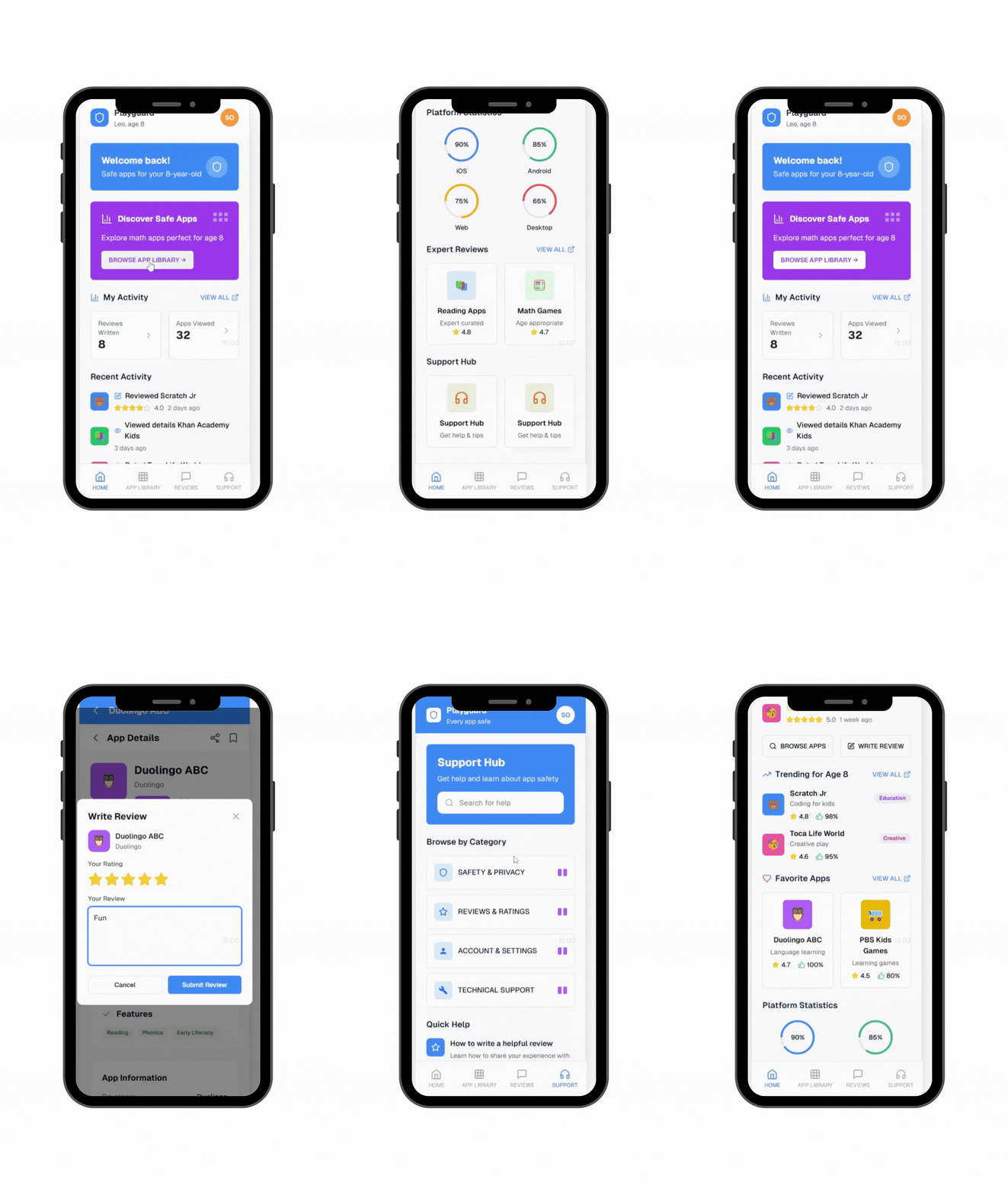
Design Mock ups
Created 14 high-fidelity UI designs for key features like the dashboard, App Library, and Trust Filter. Design mockups are ready for handoff to the development team. Ensured a polished, user-friendly interface aligned with parent needs and brand identity.
Hi-Fi Prototype
Developed 12 interactive prototypes for usability testing. Clickable flows simulating fundamental user interactions Validated design decisions and identified areas for improvement before build
.png)
TITLE OF THE CALLOUT BLOCK
Delivery and Implementation
Worked closely with two engineers and six teammates in an agile environment to implement core features like the personalized dashboard, Adaptive Trust Filter, and App Library. Functional, tested front-end. Delivered an MVP using an AI no-code development tool, Vo, with all key features aligned to user needs.
Outcome
Launched Playguard a mobile app using no code development tool Vo to create a user-validated MVP that empowers parents to choose safer, age-appropriate apps confidently.
Next Steps
Monitor usage data and gather user feedback through testing to identify areas for improvement.